

|
Getting your Trinity Audio player ready...
|
Let’s have a real “sister-to-sister” moment here. You’ve got the vision. You’ve got the ring light set up so your skin is glowing. You’ve even got that one outfit that makes you feel like a million bucks. You take a deep breath, reach out, and hit that little red “Record” button. To make your recording experience smoother, consider using a teleprompter app.
And then… blank.
Suddenly, you can’t remember your own name, let alone the three life-changing points you spent all morning thinking about. Your eyes start darting around like you’re looking for an escape hatch. You start a sentence, trip over a word, and say, “Um, uh, wait, let me start over.” Forty-five minutes later, you’re still recording the same 10-second intro, your coffee is cold, and you’re ready to throw your phone out the window.
If that sounds like your Tuesday afternoon, honey, you are not alone. Talking to a piece of glass is weird! It’s unnatural. But in 2026, video is the currency of the internet. People want to see your face and hear your voice, but they don’t want to sit through the stumbles.
Today, I’m showing you exactly how to stop the “ums” and “uhs” forever, how to use AI to write your entire script in seconds, and how to look like a professional news anchor using nothing but your phone. This is the Bigvu review you’ve been waiting for.
The “Red Light” Syndrome: Why We Get Awkward
The pain isn’t that you aren’t an expert. You know your stuff! Whether you’re teaching keto recipes, vintage guitar restoration, or how to flip houses, you are the pro. The problem is the bridge between your brain and the camera.
Traditional filming takes way too much time. You record for an hour, then you have to spend three hours in an editing app trying to cut out the “dead air” and the mistakes. By the time you’re done, you’re exhausted, and the video still looks like it was made in a basement.
In 2026, we don’t have time for that. We need a system that feels like having a professional news crew in our pocket.
The All-In-One Solution: Bigvu
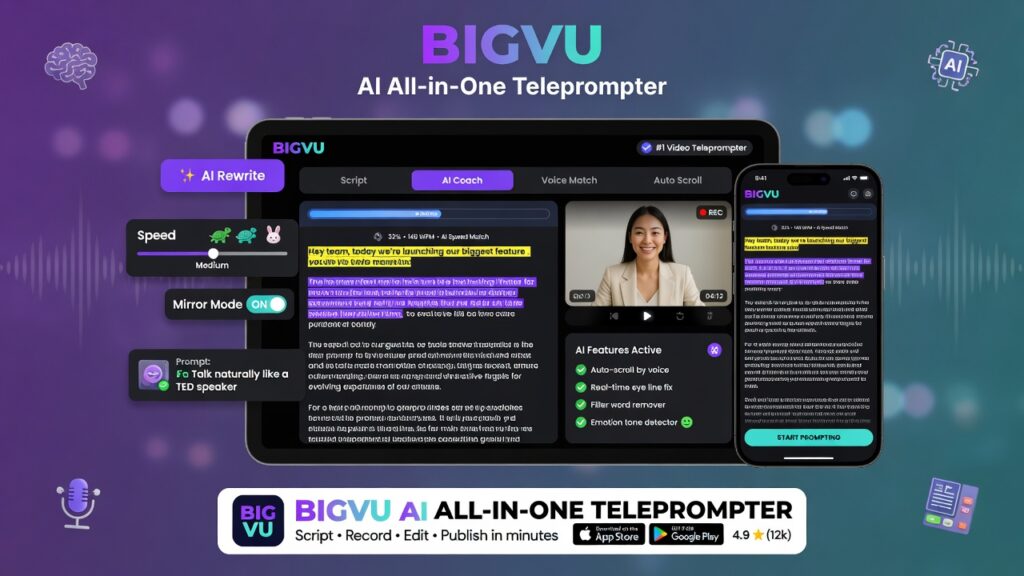
Using a Teleprompter App for Effortless Delivery
I was tired of writing scripts on sticky notes and taping them next to the camera lens. (We’ve all done it, don’t lie!) I wanted the words to roll right across the screen so I could stay engaged with you instead of trying to remember what comes next.
That’s where Bigvu comes in. It’s not just a teleprompter; it’s a full video marketing desk. Here is why this is the ultimate 2026 solution for your content:
1. The AI Script Writer (Goodbye, Writer’s Block)
Staring at a blank screen is the quickest way to kill your motivation. With Bigvu’s AI script writer, you simply tell it your topic—say, “The benefits of organic gardening”—and it spits out a high-converting script for you in seconds. It handles the hook, the body, and the call to action. You just tweak it to fit your personality and hit “Go.”
2. The Smart Teleprompter
This is the magic part. The words scroll right by the camera lens. This means you are looking directly into the eyes of your audience while you’re reading. You can adjust the speed to match your natural speaking pace. If you’re a fast talker (like me when I’m excited!), speed it up. If you like to take your time, slow it down. It’s about being your most confident self.
3. Auto-Captions & Branding
Have you seen those trendy captions on TikTok and Instagram that pop up as the person talks? Doing that manually takes forever. Bigvu does it with one tap. It uses AI to transcribe your voice and add stylish, animated captions. You can even add your logo and background music in the same app. It’s a one-stop shop.
Building the Foundation: Don’t Just Record, Build an Asset
While having a polished video is great, you need a place for those videos to live and make you money. If you’re still trying to build an online business by watching random, scattered tutorials, you’re building on sand.
In 2026, if you aren’t using AI to do the heavy lifting of business building, you’re working too hard. This is why I always talk about having a real “hub.” You need a place that helps you find your niche, designs your website, and gives you the tools to rank on page one of Google and YouTube.
The journey to freedom starts with a single post, but it thrives when you have a professional ecosystem behind you. You can actually start building that asset for free today—no credit card, no risk, just results. If you want to see how I keep my sanity while building my empire, that’s the secret.
Step-by-Step: How to Use Bigvu Like a Pro
I know new tech can seem like a lot, but I promise it’s easy. Here is your “Success with Trecia” workflow:
- Generate your Script: Use the AI tool to get your ideas out of your head and onto the screen.
- Set Your Speed: Do a quick “test read” to make sure the words aren’t moving too fast or too slow.
- Record: Look at the camera, smile, and just read. Nobody will even know you’re doing it!
- Style It: Add those captions, throw your logo in the corner, and pick a catchy tune for the background.
- Share: Post directly to your social platforms from the app.
The 2026 Content Reality
Video isn’t going anywhere. Whether you’re a coach, an affiliate marketer, or just someone with a story to tell, your face is your brand. Don’t let a “broken plugin” or a case of the “ums” keep you from your success gold.
I’ve put a special link in the description of the video below that gives you a massive discount on Bigvu to get you started. Stop the retakes and start the success.
What’s your biggest struggle when you hit record? Is it the memory, the lighting, or just feeling shy? Let me know in the comments! I’m here to make sure you stay ranked and in the money, all the time.
I’m Trecia, and I’ll see you in the next one. Peace!50 High-Profit Niches: The Ultimate “Gold-Mine” List
How to tell if someone is reading from a teleprompter?
Look for signs like unnatural pacing, lack of eye contact with the audience, repetitive gestures, or reliance on scripted language. If the speaker occasionally glances away or appears to read directly from a screen without engaging with the audience, they may be using a teleprompter.
Can I use my iPhone as a teleprompter?
Yes, you can use your iPhone as a teleprompter by downloading teleprompter apps such as Teleprompter Pro, PromptSmart, or BigVu. These apps allow you to display scrolling text for easy reading while recording video or delivering speeches.
How do people read teleprompters?
People read teleprompters by maintaining eye contact with the camera while following the scrolling text. They typically practice beforehand to become familiar with the script, allowing for a natural delivery. Adjusting the speed of the scroll can help match their speaking pace.