

|
Getting your Trinity Audio player ready...
|
AMAZON KDP • AI PUBLISHING • UPDATED FOR 2026
How to Publish a Book on Amazon KDP Using AI
A Beginner’s Step-by-Step Guide + KDPilot Review
Want to publish your first book on Amazon without spending months writing, formatting and designing everything from scratch? This guide walks you through the Amazon KDP process and shows how AI publishing software like KDPilot can help simplify the workflow.
📚 START THE TUTORIAL 🤖 CHECK OUT KDPILOT🎥 Watch Me Demonstrate KDPilot
Before we get into the complete walkthrough, you can watch my video below. I actually show you KDPilot in action so you can see what the software does before deciding whether it’s something you need.
How to Publish a Book on Amazon KDP: The Big Picture
Amazon Kindle Direct Publishing, better known as Amazon KDP, allows independent authors and publishers to publish books and make them available to Amazon customers.
That means you don’t necessarily need to convince a traditional publishing company to publish your book.
You can create the book yourself and publish it independently.
THE BASIC KDP PROCESS
IDEA
RESEARCH
WRITE
EDIT
FORMAT
CREATE YOUR COVER
PUBLISH ON AMAZON
Sounds simple, right?
Well… that’s where things can get a little complicated. 😂
Every one of those steps involves decisions, and that’s one of the reasons AI publishing tools have become so interesting.
Step 1: Choose What Kind of Book You Want to Publish
Before touching any AI software, decide what you’re trying to create.
Your options could include:
How-To Guides
Novels
Cookbooks
Children’s Books
Self-Help
Business Books
Don’t start by asking, “What can AI write?”
Start by asking:
“What would someone actually want to read or buy?”
Step 2: Research Your Amazon KDP Niche
This step matters more than people realize.
You could create the most beautiful book in the world, but if you’re targeting something nobody is searching for, making sales becomes much harder.
Research things like:
🔎 What books already appear for your topic?
⭐ How established are the competing books?
📚 What types of books are readers buying?
💬 What are readers saying in reviews?
❓ What questions aren’t competing books answering?
🎯 Can you approach the subject from a more specific angle?
KDPilot advertises an AI niche-discovery feature designed to help identify potentially lower-competition niches, keywords and categories.

KDPilot’s advertised AI niche and keyword discovery feature.
Step 3: Create Your Book Outline
Once you’ve chosen your topic, create the structure.
For a nonfiction book, that might look something like:
Chapter 1: Understanding the problem
Chapter 2: Getting started
Chapter 3: The basic strategy
Chapter 4: Common mistakes
Chapter 5: Advanced strategies
Chapter 6: Your action plan
AI can make outlining much faster, but this is where your human judgment starts becoming important.
Step 4: Write the Manuscript
Now comes the part that used to stop a lot of would-be publishers:
Actually writing the book.
KDPilot is designed to generate long-form book content from the topic and publishing direction you provide.
But here’s where I want to slow everybody down.
AI-generated does NOT mean publish-ready.
Read the manuscript.
Edit it.
Fact-check it.
Check for repetition.
Make sure it makes sense.
Make sure you have the rights to the material.
And make sure you’re creating something a real customer would be happy they purchased.
Step 5: Create a Professional Book Cover
People absolutely judge books by their covers.
Especially on Amazon.
Your cover is competing against every other cover on that search results page.
KDPilot includes an advertised AI cover-creation feature designed to help create book covers as part of the publishing workflow.

Example of KDPilot’s advertised cover creation functionality.
“If my cover appeared beside 10 competing books, would I click mine?”
Step 6: Format Your Book for Amazon KDP
Your manuscript needs to look professional once somebody opens it.
That means paying attention to:
✓ Chapter breaks
✓ Headings
✓ Spacing
✓ Margins
✓ Table of contents
✓ Page layout
✓ Ebook readability
KDPilot advertises automated formatting as part of its publishing workflow.
Step 7: Prepare Your Amazon KDP Listing
Your book isn’t finished just because the manuscript is finished.
You also need to think about the listing people will see on Amazon.
📕 Book title
✏️ Subtitle
📝 Book description
🔑 Keywords
📂 Categories
💵 Pricing
📘 Book files and cover
So Where Does KDPilot Fit In?
The attraction of KDPilot isn’t simply that it uses AI to write.
It’s that the software attempts to bring several parts of the publishing workflow together.
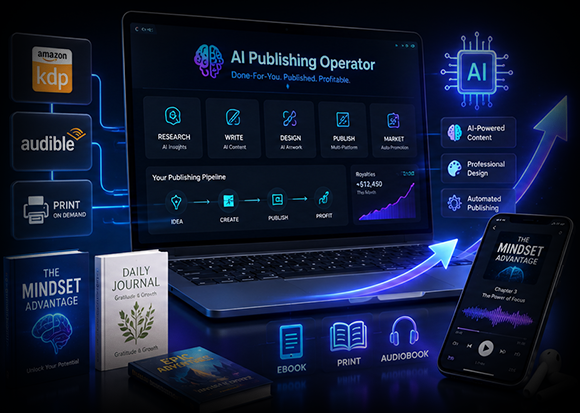
KDPilot is designed around a multi-format AI publishing workflow.
💰 How Much Does KDPilot Cost?
This is where I want to be especially transparent because KDPilot uses a typical software launch funnel.
The first price you pay gets you the core software.
After purchasing, you may be shown optional upgrades.
⚠️ Important Pricing Note
Launch pricing and upgrade offers can change. Always check the price shown on the checkout page before purchasing. You do NOT automatically need every upgrade.
KDPilot Front-End — Currently $12 One-Time
At the time of this review, the introductory sales page displays the core KDPilot offer at $12 as a one-time payment.
This is the version I would start with if you’re brand new and simply want to test the software.
CHECK CURRENT KDPILOT PRICE →KDPilot Upgrades & Upsells Explained
After the core offer, KDPilot has additional upgrades designed for people who want more capacity or additional business features.
| Upgrade | Listed Price* | Best For |
|---|---|---|
| Core KDPilot | $12 | Beginners testing the platform |
| Pro | Around $67 | Users wanting expanded/unlimited features |
| DFY | Around $37 | People wanting more done-for-you assistance |
| Automation | Around $37 | Publishers looking to automate more tasks |
| 10X Traffic | Around $37 | Users wanting additional traffic tools |
| Platinum | Around $67 | Audiobook and audio-focused publishers |
| Diamond | Around $97 | Marketers wanting broader AI/content tools |
| Reseller | Around $197 | Marketers interested in reselling software access |
*Prices shown are based on the launch funnel available at the time of this review. Upsells, downsells, discounts and launch pricing can change. Check each offer page before purchasing.
Do You Need All the KDPilot Upgrades?
No.
And please don’t let an upsell funnel convince you that you can’t use what you just bought unless you buy seven more things. 😂
My approach would be:
Beginner publishing your first book?
Start with the core version.
Hitting usage limits?
Then evaluate Pro.
Seriously building audiobooks?
Look at Platinum.
Running an agency or broader content business?
Diamond may be more relevant.
Already have an audience interested in software?
Only then would I seriously consider Reseller.
Buy an upgrade because you actually need what it does—not because a countdown timer scared you. 😂
Is There a Money-Back Guarantee?
The current KDPilot offer advertises a 30-day money-back guarantee.
As always, read the current refund terms yourself before purchasing so you understand any conditions that apply.
Who Would Benefit From KDPilot?
First-Time Publishers
People overwhelmed by all the steps required to create a book.
KDP Publishers
Existing publishers looking to streamline parts of their workflow.
Content Creators
Bloggers and YouTubers who already have information that could become books.
Coaches & Consultants
Experts who want to package their knowledge into another format.
How Can You Make Money Publishing Books?
The obvious opportunity is book royalties.
But I want you thinking bigger than one random book.
DON’T JUST THINK:
“How much can this book make?”
START THINKING:
“How can I build a catalog around one audience?”
For example, instead of creating one budgeting book, you might eventually create:
📘 A beginner budgeting guide
📗 A debt payoff workbook
📙 A 52-week savings challenge
📕 A budgeting guide for families
📓 A monthly financial planner
Now you’re not simply publishing a book.
You’re building a publishing brand.
Already Creating Content? You May Already Have Your First Book
This is one of my favorite possibilities.
Have 100 blog posts?
You have information.
Have 200 YouTube videos?
You have information.
Have years of experience answering customer questions?
You have information.
The opportunity is organizing that knowledge into a useful product.
KDPilot Pros and Cons
👍 What I Like
✓ Publishing-specific workflow
✓ AI-assisted research
✓ Manuscript creation
✓ Cover creation
✓ Formatting tools
✓ Multiple publishing formats advertised
✓ Beginner-friendly concept
✓ Low front-end launch price
👎 Things to Consider
✗ Multiple optional upsells
✗ AI content still needs human review
✗ Sales are never guaranteed
✗ Niche recommendations should be independently verified
✗ Publishing policies still matter
✗ Some marketing claims are very aggressive
✗ Launch pricing can change
My KDPilot Verdict
After looking at KDPilot, I don’t think the most interesting thing is simply:
“AI can write a book.”
We already have AI writing tools.
What makes KDPilot interesting is the attempt to put the publishing process into one workflow:
IDEA → RESEARCH → MANUSCRIPT → COVER → FORMATTING → PUBLISHING
If you’re serious about learning how to publish a book on Amazon KDP and the technical side has been stopping you, I think KDPilot is worth investigating.
But I wouldn’t buy it because somebody promised easy passive income.
I’d buy it if it solves a real problem in my publishing workflow.
Does it save you time?
Does it replace tools you’re already paying for?
Does it make the publishing process easier for you?
Those are the questions that matter.
Want to Try KDPilot?
If you want to see the current KDPilot offer and decide whether the software fits your publishing goals, use my link below.
👉 CHECK OUT KDPILOTAffiliate Disclosure: I may receive compensation if you purchase through my link at no additional cost to you. Prices and offers can change. Publishing books does not guarantee sales or income.
Frequently Asked Questions
How do I publish a book on Amazon KDP?
The basic process involves choosing your book topic, researching the market, writing and editing your manuscript, formatting the book, creating a cover, preparing your title, description, keywords and categories, and submitting your files through your Amazon KDP account.
Can I use AI to publish a book on Amazon KDP?
AI can assist with parts of the publishing workflow, but publishers remain responsible for complying with Amazon’s current policies, accurately providing required information and ensuring they have the necessary rights to the content they publish.
How much does KDPilot cost?
At the time this article was updated, the KDPilot front-end sales page displayed a $12 one-time launch price. Optional upgrades are offered separately, and pricing can change, so check the current checkout page before purchasing.
Do I need all the KDPilot upsells?
No. Beginners may want to start with the core version and only consider an upgrade if they encounter a limitation or need a specific feature included in a higher tier.
Does KDPilot guarantee that my books will make money?
No. Software can help with production, research and workflow, but it cannot guarantee sales, rankings or royalties. Your niche, book quality, competition, pricing and marketing all matter.
Is KDPilot good for beginners?
The software is marketed toward beginners as well as existing publishers. Its main appeal for a beginner is bringing several publishing tasks into one workflow instead of requiring separate tools for each step.